
I started this blog in 2021. Back then, dev.to was taking off, but I also wanted a place I could call home. A real blog with my domain on it.
Hashnode had everything I needed: markdown editing (with a nice UI!), custom domains, hassle-free setup, good community. Even backups to Github! However, things have shifted since the early days. Enough so that I started losing my peace of mind. I finally decided move on.
In this article, I will explain why I switched, to what, and how I managed to not lose all my indexing and SEO.
Why hashnode doesn’t bring me peace of mind anymore
Losing days of work without notice
I was editing a blog post on hashnode in early January. I spent hours on it, spread over multiple days. On the last day, I hit preview and sent the URL to my boyfriend’s phone. 404. I went to my tab, ensured I hit “save” once more, waited for the save icon to show, and refreshed. Error. Seems like I had lost my session, but hashnode never told me so. I had been editing a page on an “incognito” window for days, and after logging back in, all of my changes were gone. Irrevocably.
Alarming community reports
This experience made me search a bit on ways to get support. This is how I stumbled on many alarming articles and discussions online, about users losing posts, unable to edit or backup their site, the IOS app gone, and an overall complete lack of support from the hashnode team.
One such report is from GREENflux, who published It Might Be Time To Migrate Your Hashnode Blog in July 2025:
in the last ~6 months, a lot has changed:
No post on LinkedIn or X since January 2025
No updates to change log since November 2024
No Newsletter since October 2024
DevRel/Community manager left around same time newsletters stopped
Ten’s of support forum posts >30+ days old, with no reply from support
New issues with Google indexing, multiple users reported, no word from support
Working features being deprecated (custom CSS)
Since then, more and more users have raised complaints or migrated away:
- Why I’m Leaving Hashnode and Moving to WordPress (November 2025)
- r/hashnode: Why are my articles are getting deleted automatically? (October 2025)
- r/hashnode: Articles Keep Getting Deleted (February 2026)
- r/hashnode: Can’t we edit our blog articles in hashnode anymore? (March 2026)
Unable to export data
It made me paranoid, and I started to check my backups. This was March 2026. The GitHub integration had gone away from the UI, and nothing had been committed for months. The export options were also nowhere to be found (and still aren’t available).
…And more
On top of this, I noticed multiple things I am not happy with. To cite a few:
- They constantly change the theme and the look-and-feel of the blog, which sometimes doesn’t align with my tastes.
- The CDN changed, and some images are now directly served by S3, while others from the CDN.
- The overall performance of the site varies greatly. It is sometimes so bad it triggers alerts!
- With the new editor rehaul, the raw markdown toggle is gone.
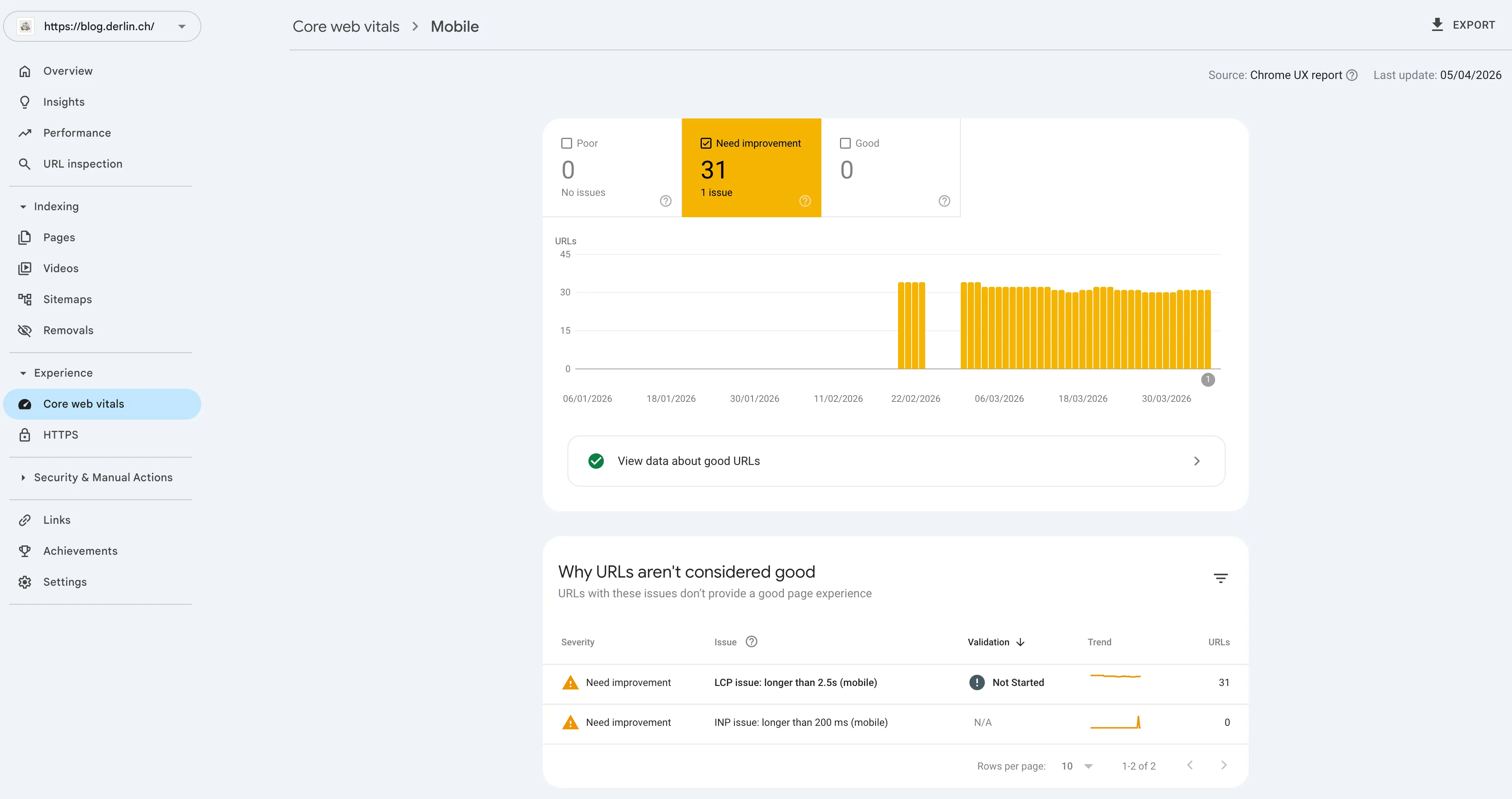
What are LCP and INP?
LCP is short for Largest Contentful Paint and tracks loading speed by measuring when the largest visible element renders. INP is short for Interaction to Next Paint and measures responsiveness by checking the latency of user interactions like clicks.
How I exported all my posts and images
As I mentioned, the export feature is gone from the UI, and a month ago the GitHub integration was, too (it just came back, but for how long?).
Hopefully, the GraphQL API was still available. It didn’t take long to craft a Python script to download all the posts and the drafts from it, and save everything into a JSON file.
Python script used to export the drafts and posts
import json
import os
import time

import requests


API_URL = "https://gql.hashnode.com"
API_TOKEN = os.getenv("HASHNODE_API_TOKEN")
OUTPUT_FILE = "hashnode_complete_backup.json"

headers = {
    "Authorization": API_TOKEN,
    "Content-Type": "application/json",
}


def run_query(query, variables=None):
    response = requests.post(
        API_URL, headers=headers, json={"query": query, "variables": variables}
    )
    if response.status_code != 200:
        raise Exception(
            f"Query failed with status {response.status_code}: {response.text}"
        )
    return response.json()


# --- QUERIES ---

LIST_PUBS_QUERY = """
query {
  me {
    publications(first: 20) {
      edges { node { id title } }
    }
  }
}
"""

# Query for published posts with pagination
POSTS_PAGINATED_QUERY = """
query GetPosts($id: ObjectId!, $after: String) {
  publication(id: $id) {
    posts(first: 20, after: $after) {
      edges {
        node {
          id
          title
          subtitle
          brief
          slug
          url
          canonicalUrl
          readTimeInMinutes
          publishedAt
          updatedAt
          coverImage {
            url
            isPortrait
            attribution
          }
          author {
            id
            name
            username
          }
          tags {
            id
            name
            slug
          }
          seo {
            title
            description
          }
          content {
            markdown
            html
          }
          features {
            tableOfContents {
              isEnabled
            }
          }
        }
      }
      pageInfo {
        hasNextPage
        endCursor
      }
    }
  }
}
"""

# Query for drafts with pagination
DRAFTS_PAGINATED_QUERY = """
query GetDrafts($after: String) {
  me {
    drafts(first: 20, after: $after) {
      edges {
        node {
          id
          title
          subtitle
          slug
          updatedAt
          coverImage {
            url
          }
          tags {
            name
            slug
          }
          seo {
            title
            description
          }
          content {
            markdown
          }
        }
      }
      pageInfo {
        hasNextPage
        endCursor
      }
    }
  }
}
"""


def get_all_paginated_items(query, query_path, variables=None):
    """Generic helper to loop through GraphQL pages"""
    items = []
    has_next = True
    after_cursor = None

    while has_next:
        vars = variables.copy() if variables else {}
        vars["after"] = after_cursor

        resp = run_query(query, vars)

        # Navigate the JSON path to find the connection object
        data = resp["data"]
        for key in query_path:
            data = data[key]

        # Append nodes
        items.extend([edge["node"] for edge in data["edges"]])

        # Check pagination
        has_next = data["pageInfo"]["hasNextPage"]
        after_cursor = data["pageInfo"]["endCursor"]

        if has_next:
            print(f"  ...fetching next page (current count: {len(items)})")
            time.sleep(0.5)  # Gentle rate limiting

    return items


def main():
    print("🚀 Starting full Hashnode export...")
    full_export = {"publications": [], "drafts": []}

    # 1. Fetch Publications
    pub_resp = run_query(LIST_PUBS_QUERY)
    pubs = pub_resp["data"]["me"]["publications"]["edges"]

    # 2. Loop through Publications for Posts
    for pub in pubs:
        p_id = pub["node"]["id"]
        p_title = pub["node"]["title"]
        print(f"\n📦 Exporting Publication: {p_title}")

        posts = get_all_paginated_items(
            POSTS_PAGINATED_QUERY, ["publication", "posts"], {"id": p_id}
        )

        full_export["publications"].append(
            {"id": p_id, "title": p_title, "posts": posts}
        )

    # 3. Fetch All Drafts
    print("\n📝 Exporting all Drafts...")
    full_export["drafts"] = get_all_paginated_items(
        DRAFTS_PAGINATED_QUERY, ["me", "drafts"]
    )

    # 4. Save to JSON
    with open(OUTPUT_FILE, "w", encoding="utf-8") as f:
        json.dump(full_export, f, indent=4, ensure_ascii=False)

    print(f"\n✅ Success! Saved to {OUTPUT_FILE}")


if __name__ == "__main__":
    main()
Once I had the markdown, HTML and all the metadata, I crafted another Python script to loop through
the posts, extract all the image links, and download them into a folder following the structure
hashnode_assets/[posts|drafts]/<post-id>/<image-name>.
Python script to download all images from posts
It worked for me, but double-check the output to ensure it looks correct
import json
import re
import requests
from pathlib import Path
from urllib.parse import urlparse

# Configuration
INPUT_JSON = Path("hashnode_complete_backup.json")
BASE_IMAGE_DIR = Path("hashnode_assets")

# Regex to find Hashnode CDN URLs
GLOBAL_IMAGE_REGEX = r'(https?://[^\s"\'\)]+?\.(?:png|jpg|jpeg|gif|webp|svg|avif))'

def get_images_from_dict(data_dict):
    """Recursively finds all Hashnode CDN URLs in a dictionary or string."""
    # Convert the entire post/draft object to a string to find URLs in all fields at once
    data_str = json.dumps(data_dict)
    return {i.strip("\\") for i in re.findall(GLOBAL_IMAGE_REGEX, data_str, re.IGNORECASE)}


def download_images_to_subfolder(urls, subfolder_path):
    """Downloads a set of URLs into a specific pathlib directory."""
    if not urls:
        return

    subfolder_path.mkdir(parents=True, exist_ok=True)

    for url in urls:
        try:
            # Clean filename
            clean_url = url.split("?")[0]
            filename = Path(urlparse(clean_url).path).name

            if not filename or "." not in filename:
                filename = f"image_{hash(url)}.jpg"

            target_file = subfolder_path / filename

            # Only download if it doesn't exist
            if not target_file.exists():
                response = requests.get(url, stream=True, timeout=15)
                if response.status_code == 200:
                    with open(target_file, "wb") as f:
                        for chunk in response.iter_content(1024):
                            f.write(chunk)
        except Exception as e:
            print(f"  ⚠️ Failed to download {url}: {e}")


def process_export():
    if not INPUT_JSON.exists():
        print(f"❌ Error: {INPUT_JSON} not found.")
        return

    data = json.load(INPUT_JSON.open(encoding="utf-8"))

    # 1. Process Published Posts (by Publication)
    for pub in data.get("publications", []):
        print(f"📦 Processing Publication: {pub.get('title')}")
        for post in pub.get("posts", []):
            post_id = post.get("id")
            print(f"  📄 Post: {post.get('title')} ({post_id})")

            urls = get_images_from_dict(post)
            folder = BASE_IMAGE_DIR / "posts" / post_id
            download_images_to_subfolder(urls, folder)

    # 2. Process Drafts
    print(f"\n📝 Processing Drafts")
    for draft in data.get("drafts", []):
        draft_id = draft.get("id")
        print(f"  📄 Draft: {draft.get('title') or 'Untitled'} ({draft_id})")

        urls = get_images_from_dict(draft)
        folder = BASE_IMAGE_DIR / "drafts" / draft_id
        download_images_to_subfolder(urls, folder)

    print(f"\n✅ All assets organized in {BASE_IMAGE_DIR}")


if __name__ == "__main__":
process_export()My new solution
I first looked around for another platform, but let’s be honest: any platform can die, or make changes that do not suit one’s taste. It is time to fire up a custom solution.
The tech stack
The choice of framework was easy enough. After weighing a bit the pros and cons, I finally settled for Astro over Hugo for a single reason: for a website, going with TypeScript makes sense.
In terms of theme and functionalities, I wanted to stay as close as possible to what I currently have on hashnode: a simple listing page as home, and dark, centered and elegant article pages without any fuss. The best was to go with a custom theme, which is not that hard to do in the age of AI.
In terms of hosting, again multiple options, but for simple static sites I usually end up with GitHub Pages. It is fast, easy to automate, and supporting custom domains.
For search, I opted for pagefind, a fully static search library that indexes all the content at build time and provides super fast search without any infrastructure. It can work with any content, as long as it is HTML.
Finally, Hashnode kept track of how many users visited each page. To keep getting some insights, I opted for umami, which is privacy-friendly and purpose-built for simple site analytics. And their free tier is generous (100K events per month)! This, of course, on top of Google Search Console (GSC).
The data import
This time, I simply ask my overlord (that is, an AI), to come create the Astro structure based on
the export. The result is a directory per post, with images colocated with the index.md.
After this automatic migration, some manual tweaks were required:
-
The local image links on Hashnode markdown have this annoying
align="center"that breaks normal markdown parsers. For example: -
Links to other pages in the same blog on hashnode’s exported markdown are absolute, though ideally you want them relative.
-
Callouts or other “special” features of hashnode are broken unless you implement them in Astro as well. Personally, the only necessary feature was the
<callout>. For example:<div data-node-type="callout"> <div data-node-type="callout-emoji">⚠</div> <div data-node-type="callout-text">blabla</div> </div>Instead of adding CSS support for this custom HTML (which is annoying in markdown files), I installed the rehype-callout plugin in Astro. This let’s me use the GitHub-Flavored syntax for callouts:
> ![warning]
> blabla
The backward-compatibility of links
The biggest requirement for this migration was to keep the exact same links on the new blog,
so all the URLs shared around will still work. Hashnode generates the links <base_url>/<slug>
(without trailing slash). Astro lets you define the slug in the front matter of each article, but
works with trailing slashes by default. That was bothering.
The fake good idea
At first, I opted for using the appendSlash option in Astro and simply set it to never. However,
by doing this I had to also switch the build mode from directory to file. What it does is
creating dist/<slug>.html instead of dist/<slug>/index.html.
This was working fine (after I rewrote the search to strip the index.html from the URL and other
such tweaks), until I tried serving my dist folder using python instead of the built-in Astro
dev server… A basic http server will never fall back to <slug>.html for a request to <slug>!
That was a completely stupid idea from the start, but it made me learn something: always use a
static server to test your dist build, never only rely on the dev server shipped with your
framework!
If you have python installed, simply use the following at the root of your Astro project:
bash python3 -m http.server -d dist
Don’t forget to build your site first!
The reality (simpler than it looks)
From an SEO perspective, changing URLs to trailing slashes should not be an issue, as long as:
- The URLs minus the slash are the exact same,
- The URLs minus the slash redirect to URLs with trailing slashes (
301).
So the solution is easy:
- Use Astro’s default build mode (
directory). - Set the
appendSlashtoalwaysin Astro’s config. - Ensure all slugs are exactly the same in Hashnode and Astro.
- Ensure all links (e.g. relative links) use the
/at the end. - Ensure the production server is properly redirecting “no slash” to “trailing slash” (with a 301).
On GitHub Pages, the redirects are handled automatically. Assuming you deploy a page
<slug>/index.html, asking for <slug> will automatically redirect to <slug>/ and load the
<slug>/index.html file. Which is exactly what we want!
Note that if you use the
@astrojs/sitemap, a sitemap with
trailing slashes will be available at <site>/sitemap-index.xml.
Testing the new site
Before switching, I had to test the new website on GitHub Pages using the default URL:
https://<user>.github.io/<repository> (see Astro’s documentation on
how to deploy on GitHub Pages). However, this
website MUST NOT be crawled, otherwise it may trigger a load of SEO issues.
To be on the safe side:
-
Ensure the canonical URL on every page is the final, production URL. And this even when hosted somewhere else or running locally.
<link rel="canonical" href="https://blog.derlin.ch/why-i-moved-away-from-hashnode/"> -
Dynamically generate a
robots.txtbased on the host that willDisallow: /on all but the final domain. Since this is environment-dependent, use a Static File Endpoints such as the following inpages/robots.txt.js:export function GET({ params, request }) { if (import.meta.env.BASE_URL.includes("blog.derlin.ch")) { const robotsTxt = `User-agent: * Allow: / Sitemap: https://blog.derlin.ch/sitemap-index.xml `; return new Response(robotsTxt, { headers: { "Content-Type": "text/plain" }, }); } return new Response("User-agent: *\nDisallow: /", { headers: { "Content-Type": "text/plain" }, }); }
Just for added security, I also added this to my BaseHead.astro responsible for generating the
<head> content:
{!import.meta.env.BASE_URL.includes("blog.derlin.ch") && <meta name="robots" content="noindex, nofollow" />}This way, the new site can be tested as much as needed without interfering with the live site or the SEO.
The switch
First, some final checks:
- The new sitemap looks good, and the hashnode sitemap (
sitemap.xml) returns404, - The canonical meta tags and all internal links use the trailing slash,
- The
robots.txtis correct, - The old URLs (without trailing slash) return a
301.
Once all the boxes are ticked, the switch is the easy part:
- Lower the TTL on the
blog.derlin.chDNS record, - Rebuild the website on GitHub, telling Astro it is served on the live site (environment variable
SITE=https://blog.derlin.ch), - Add the domain to GitHub Pages,
- Switch the DNS to GitHub,
- Wait a bit and panic because GitHub’s DNS checks take a long time to propagate: even with a TTL of 1 second, it takes at least 5 minutes for GitHub to properly validate it,
- Head over to the Google Search Console, and submit the new sitemap link.
And we are live!
The re-indexing on Google Search Console
I migrated on April 6th in the afternoon. Two days later (April 8th), I received a notification from the Google Search Console (GSC):
New reasons prevent pages in a sitemap from being indexed on site https://blog.derlin.ch/
The issue, “Duplicate, Google chose different canonical than user”, applies to all the new trailing slash URLs. If I inspect one of those URLs, it shows me the following:
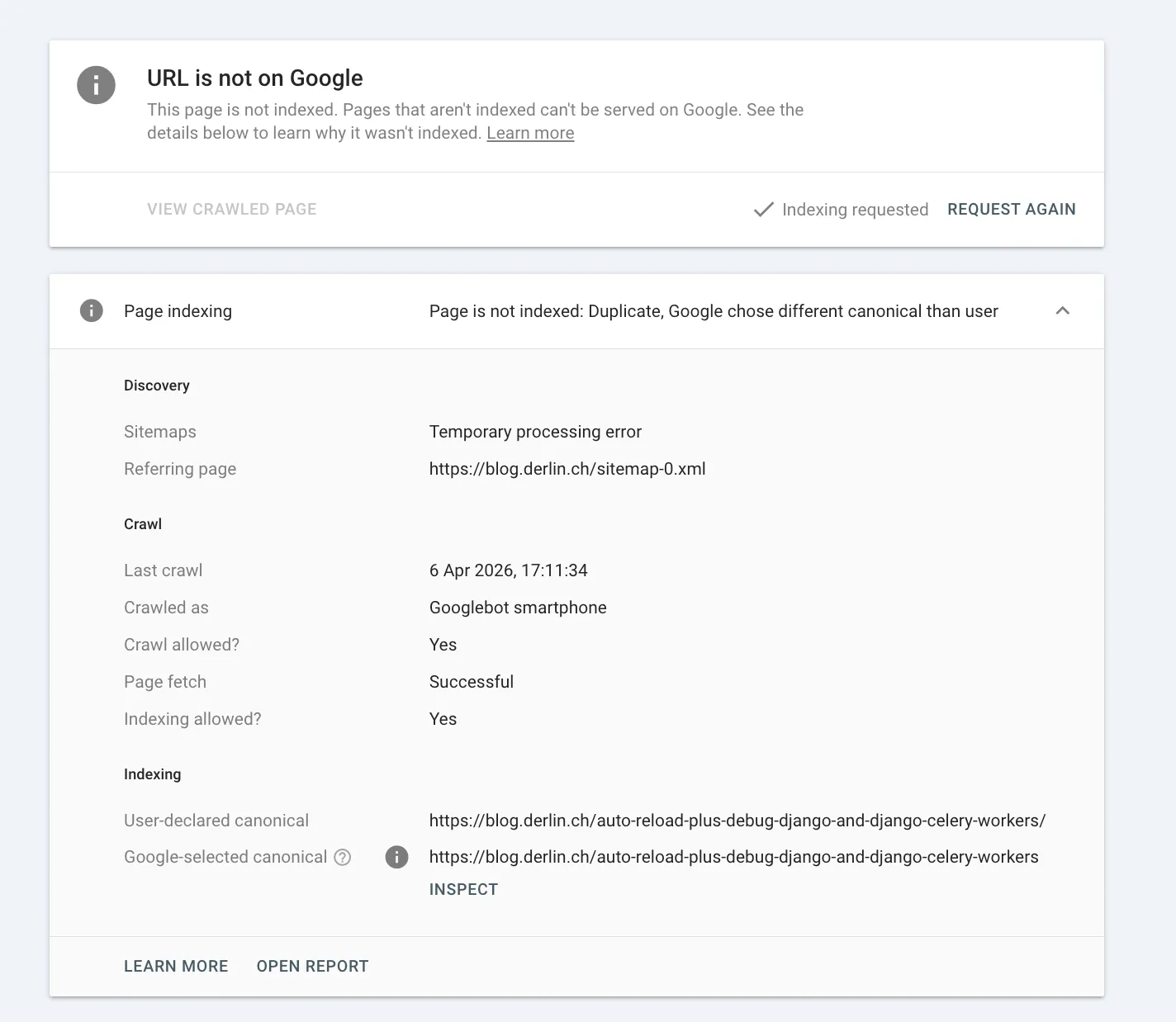
The indexing section at the bottom shows the “smoking gun”:
- User-declared canonical:
.../auto-reload...workers/(with slash) - Google-selected canonical:
.../auto-reload...workers(no slash)
Google’s index is “sticky.” It has historical data (clicks, backlinks) pointing to the no-slash version. It sees the new page, but is insisting that the old URL structure is the “correct” one to show in search results.
However, this makes it stuck in a loop of its own making: it won’t index the new one because it’s a duplicate, and it won’t index the old one because it’s a redirect.
One of the frictions comes from the fact that that old sitemap was last crawled very recently. Thus:
- It knows the old URLs from the April 3rd crawl.
- It is discovering the new slash-URLs via the April 7th crawl.
- Because the content is identical, it’s defaulting to the “oldest” version it trusts.
From there, nothing much to do except wait for Google to figure it out by itself. To help the process, I:
- Hit the “Request Indexing” button on some of the pages I inspected above,
- Hit the “Validate Fix” on the “Duplicate, Google chose different canonical than user” issue page, which is supposed to trigger a more aggressive re-scan of the affected paths within 24-72 hours.
The validation failed a few days later, but nevertheless, more and more pages showed the correct canonical. I am now just waiting. It took a long time and resolved in waives, but I am nearly there!
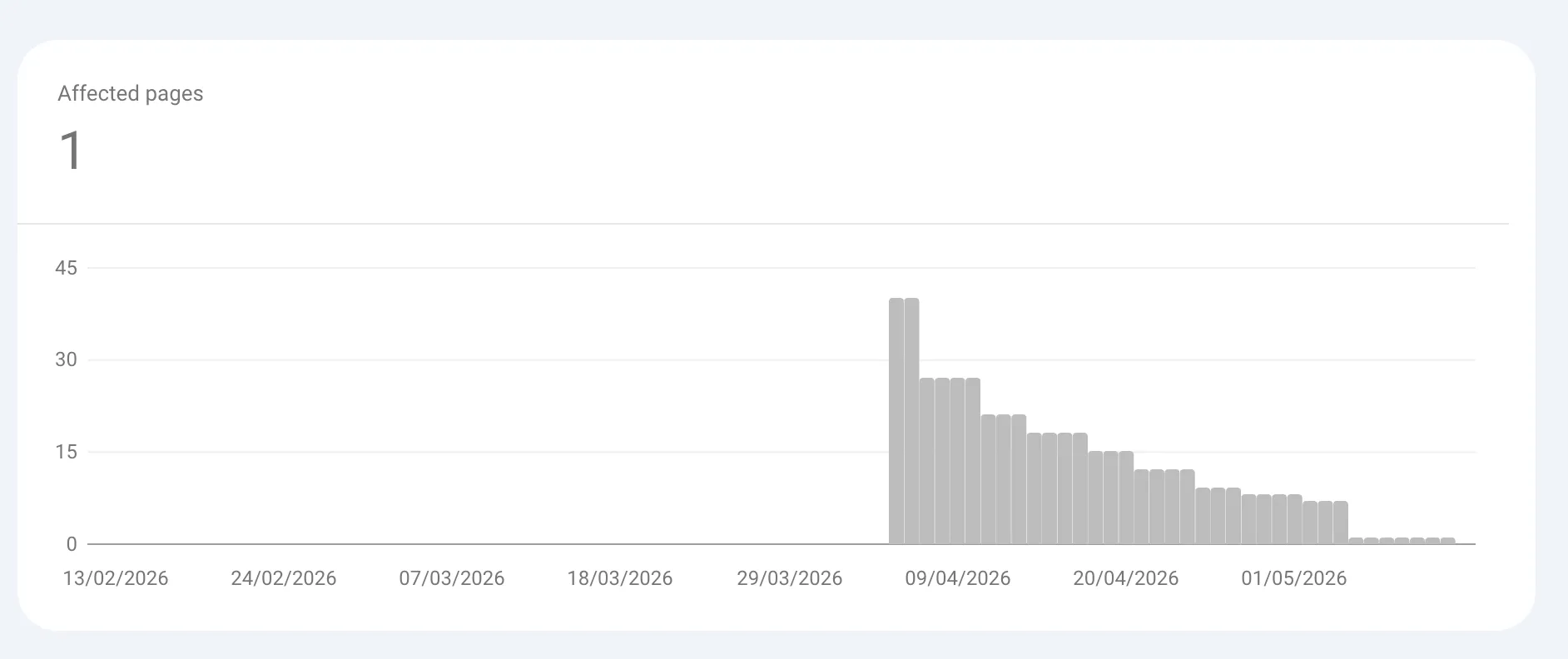
Google Search Console (GSC) has a known “lag” issue. For a while, I saw a conflict between the Aggregated Report (Duplicate canonical) and the Live Inspection. The source of truth in this case will always be the URL inspection screen.
Conclusion
The migration is complete, the site is live, Google is catching up, and I have my peace of mind back. What I love most? It’s simple. No unnecessary features, no unwanted changes, no surprises. Just a clean blog that does exactly what I need and nothing more. And it’s mine.
I feared a bit the transition, but now that it is behind I can only encourage you to do the same. With all the AI tools around, it is much simpler than it was back then. Just remember: be careful with SEO!